Integrating Claude Fable 5 into Enterprise Workflows: A Practical Guide
Key Takeaways
- Claude Fable 5 integration connects to any workflow platform — n8n, OpenBots, UiPath, or custom REST clients — via Anthropic’s standard HTTP API.
- No custom connectors are required: an HTTP Request node with a JSON body and an API key in the Authorization header is sufficient to get started.
- The safety fallback to Claude Opus 4.8 is a behaviour to plan for, not an error — check
stop_reasonin every response and route accordingly. - Prompt caching, effort-level tuning, and input summarisation are the three highest-impact levers for controlling Fable 5 costs in production workflows.
- The strongest results come from embedding Fable 5 as a reasoning node inside a broader automation pipeline, not from using it as a standalone prompt interface.
Introduction
Having access to a Mythos-class AI model is one thing. Making it useful inside your existing processes is another. Claude Fable 5 ships with a 1 million-token context window and top-tier performance across coding, document reasoning, and vision tasks — but those capabilities only translate into business value when the model is wired into the systems your team actually uses.
Most integration questions follow a familiar pattern: How do I authenticate? Where does the prompt come from? What do I do with the output? How do I handle the safety fallback? And how do I avoid a runaway API bill?
This guide answers all of those questions with practical, tool-specific guidance for n8n, OpenBots, and UiPath — the platforms most commonly used in enterprise automation stacks. Whether you are building a document analysis pipeline, a code migration workflow, or a multi-agent orchestration layer, the patterns here will get you to production faster.
If you have not yet reviewed what Fable 5 can do and how its safety mechanisms work, start with our post on Claude Fable 5: Capabilities, Safety Mechanisms & Enterprise Use Cases before building your first workflow.
Why Integrate Fable 5 Rather Than Use It Directly?
The Claude.ai interface and API Workbench are useful for exploration. Production automation is a different requirement. When you embed Fable 5 inside a workflow, you gain four things that a chat interface cannot give you.
First, you control the data flow. Your workflow can fetch documents from an email inbox, a shared drive, or an ERP system — pre-process them, send structured input to Fable 5, and route the output automatically to wherever it needs to go. No manual copy-paste, no human bottleneck at the prompt stage.
Second, you get repeatability. A workflow runs the same way every time, with the same prompt template, the same output parsing logic, and the same error handling. This is essential when the outputs feed into compliance records, financial reports, or downstream automation.
Third, you can mix Fable 5 with other tools. An RPA bot can handle the screen interactions and file handling that a language model cannot. A database node can persist results. A notification step can alert the right person when a review is needed. The model is one node in a larger system — and that is where it delivers the most value.
Fourth, cost control becomes tractable. In a workflow, you can apply caching, input summarisation, and effort-level tuning consistently — rather than relying on individual users to optimise their prompts.
Preparation: API Access and Authentication
Before you build anything, you need three things in place: an API key, a clear picture of your pricing exposure, and an understanding of the fallback mechanism.
1. Choose Your Access Channel
Fable 5 is available via the Anthropic Claude API (model string: claude-fable-5), and through AWS Bedrock, Google Vertex AI, and Microsoft Foundry for teams with existing cloud infrastructure commitments. Choose the channel that aligns with your data residency requirements and existing procurement contracts. For most teams starting fresh, the Anthropic API is the simplest path.
2. Generate and Secure Your API Key
Create an API key in your Anthropic console and store it in your platform’s secrets manager — never hard-code it in workflow definitions. Pass it in the Authorization header as Bearer YOUR_API_KEY on every request. Rotate keys on a schedule and use separate keys for development and production environments so you can revoke one without disrupting the other.
3. Understand the Cost and Fallback Model
Fable 5 is priced at $10 per million input tokens and $50 per million output tokens. Prompt caching reduces the input cost by 90% on repeated context. When a request triggers the safety classifier — covering high-risk areas like offensive cybersecurity or detailed synthetic biology — the call is automatically rerouted to Claude Opus 4.8 and billed at Opus rates. If the classifier blocks the response entirely before output is generated, the request is not billed. Build your cost estimates around your expected token volumes and factor in a small buffer for fallback events.
The Five-Step Integration Process

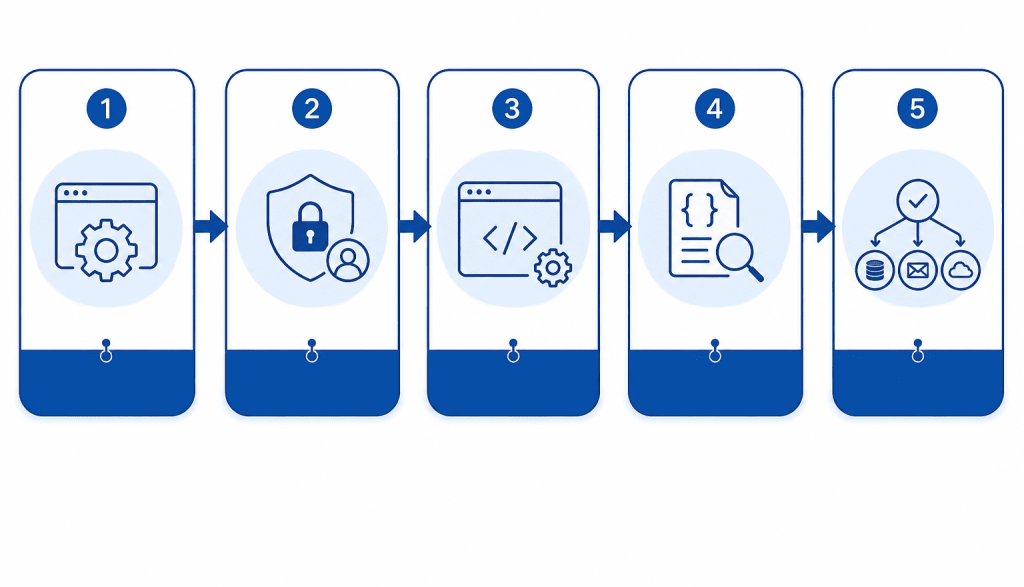
Every successful Fable 5 integration follows the same five-stage pattern, regardless of which platform you use. The diagram above illustrates the flow; the sections below walk through each stage in detail for n8n, OpenBots, and UiPath.
Stage 1 — API Setup
Configure your API endpoint (https://api.anthropic.com/v1/messages) and model string (claude-fable-5) in your workflow platform. Set the HTTP method to POST and the Content-Type header to application/json.
Stage 2 — Authentication
Add your API key to the Authorization header: Bearer YOUR_API_KEY. Store the key as a credential or secret in your platform rather than as a static string. Also add anthropic-version: 2023-06-01 as a required header.
Stage 3 — Workflow Configuration
Build the JSON request body dynamically. At minimum, the body needs the model field, a max_tokens value, and a messages array containing your prompt. Pull the prompt content from upstream nodes — a file read, a database query, or a previous processing step — rather than hard-coding it.
Stage 4 — Processing
Fable 5 returns a JSON response with a content array and a stop_reason field. Parse the content to extract the model’s output. Check stop_reason on every response: a value of end_turn means a full Fable 5 response; refusal means the safety classifier triggered and the response came from Opus 4.8.
Stage 5 — Output Routing
Route the parsed output to its destination — a database write, an email notification, a CRM update, an RPA trigger, or a further processing step. For workflows with a compliance or audit requirement, log the stop_reason, the model used, and the timestamp alongside the output.
Integration with n8n
n8n is a natural fit for Fable 5 workflows. Its HTTP Request node handles the API call without any custom code, and its visual canvas makes it straightforward to build multi-step pipelines that combine Fable 5 with databases, messaging services, and other APIs. If you are self-hosting n8n, our guide on how to host n8n on your own server covers the setup process in detail.
Step-by-Step: Calling Fable 5 from n8n
- Create a new workflow and add a trigger — a Webhook, Schedule, or any event node that starts the process.
- Add an HTTP Request node. Set the method to POST and the URL to
https://api.anthropic.com/v1/messages. - Configure headers. In the Headers section, add three entries:
Authorization: Bearer {{ $credentials.claudeApiKey }},Content-Type: application/json, andanthropic-version: 2023-06-01. Store your API key as a stored credential in n8n’s credential manager. - Set the request body. Switch the body type to JSON and build the payload. Use n8n expressions to pull the prompt text from upstream nodes — for example,
{{ $json.extractedText }}from an earlier document-processing step. - Parse the response. Add a Code node or Set node after the HTTP Request. Extract
{{ $json.content[0].text }}for the model’s output and{{ $json.stop_reason }}for the fallback check. - Add downstream routing. Use an IF node to branch on
stop_reason: full responses go to the main output path; fallback responses can be flagged, retried with a different prompt, or logged for review.
Trigger → Action: New contract PDF arrives in a monitored email inbox → Gmail node downloads the attachment → PDF Extract node pulls the text → HTTP Request node sends the text to Fable 5 with a compliance-analysis prompt → Code node parses the risk flags → Airtable node writes the results → Slack node sends a summary to the legal team channel.
Example: A professional services firm uses this exact pattern to process incoming NDAs. Fable 5 identifies non-standard clauses, unusual liability caps, and missing sections in seconds. The legal team receives a structured summary in Slack and only opens the full document when the model has flagged an issue — cutting their NDA review time from 45 minutes per document to under 10.
Cost Management in n8n
n8n charges per workflow execution rather than per individual node call, which keeps your automation platform costs predictable. On the Fable 5 side, use a Summarise node before the HTTP Request to compress long source documents — sending a 2,000-token summary instead of a 40,000-token raw document can cut input costs by over 95%. Where the same background context is sent on every call (system prompts, policy documents, data schemas), enable prompt caching to apply the 90% input discount.
Integration with OpenBots
OpenBots Studio uses a command-based architecture where each action in a bot is an explicit command. Calling Fable 5 requires an HTTP Request command followed by a JSON parse command — straightforward to configure and easy to audit.
Step-by-Step: Calling Fable 5 from OpenBots
- Add an HTTP Request command. Set the method to POST, the URL to the Claude API endpoint, and the content type to
application/json. - Set the Authorization header. In the Headers section, add
Authorization: Bearer YOUR_API_KEYusing a variable that references a secure credential store — not a hard-coded string in the bot file. - Build the request body. Construct the JSON payload using OpenBots string-builder commands. Pull the prompt text from a variable populated by an earlier command — a file-read, a database query, or a screen-scrape.
- Store the response. Assign the HTTP response to a variable. Then use a JSON Parse command to extract the content text and stop_reason fields.
- Route on stop_reason. Add an If/Else command: if
stop_reason == "end_turn", proceed with the main path; otherwise log the fallback event and apply your exception-handling policy. - Write the output. Pass the extracted content to a Write to File command, a database update command, or a CRM integration command depending on your use case.
Trigger → Action: OpenBots monitors a shared folder for new invoice files → Reads each file and extracts text via OCR command → Sends extracted text to Fable 5 for line-item extraction and PO matching → Parses the JSON response → Updates the ERP record via a database command → Flags exceptions for human review.
Example: A logistics company uses an OpenBots bot to process 800 supplier invoices per week. Fable 5 handles the extraction and cross-referencing logic; OpenBots handles the file operations and ERP writes. The straight-through processing rate rises from 58% to 89%, and the accounts payable team focuses entirely on the 11% of invoices the bot flags as exceptions.
Integration with UiPath
UiPath’s strength is its ability to interact with desktop applications and browser UIs — tasks that APIs cannot reach. When you combine that RPA capability with Fable 5’s reasoning, you can automate end-to-end processes that cross both the web layer and the AI reasoning layer.
Step-by-Step: Calling Fable 5 from UiPath
- Add an HTTP Request activity. In the UiPath Studio Activities panel, find the HTTP Request activity (under Web > HTTP Client). Set the method to POST and the endpoint URL to the Claude API.
- Configure headers. In the Headers property, add your Authorization key and the anthropic-version header. Store your API key in UiPath Orchestrator’s Assets rather than in the workflow directly.
- Set the body. In the Body property, build the JSON string using a VB.Net or C# expression. Reference upstream variables for the prompt content — for example, a string variable populated by a previous Read PDF activity or a Get OCR Text activity.
- Deserialise the response. Use a Deserialize JSON activity to parse the HTTP response. Extract the content text and stop_reason fields into typed variables.
- Branch on stop_reason. Add an If activity. Route
stop_reason = "end_turn"to your main processing sequence. Route fallback responses to a logging sequence and optionally a human review queue in Orchestrator. - Use the output. Pass the extracted content to Excel activities, email activities, database activities, or further RPA steps depending on your workflow requirements.
Trigger → Action: UiPath bot opens a legacy ERP application and extracts a batch of transaction records via screen scraping → Formats the data as a structured prompt → Sends it to Fable 5 for anomaly detection and narrative summary → Deserialises the response → Writes the summary to a SharePoint document → Sends an approval email to the finance manager.
Example: An insurance company uses a UiPath + Fable 5 workflow for monthly claims reconciliation. The bot accesses the legacy claims system (which has no API), extracts the data, and hands it to Fable 5 for pattern analysis. What previously required a two-day manual reconciliation process is completed overnight as a scheduled Orchestrator job.
Example End-to-End Workflow: Contract Compliance Pipeline
To show how the three platforms can work together, here is a complete document analysis pipeline for compliance review.
| Step | What Happens | Tool |
|---|---|---|
| 1. Document capture | Monitor a shared inbox for new contract PDFs; download each attachment | UiPath or n8n (Gmail/Outlook node) |
| 2. Text extraction | Run OCR on the PDF to extract clean text; store in a staging variable | UiPath (Read PDF activity) or OpenBots (OCR command) |
| 3. Summarise input | Compress the raw text to a structured summary before sending to Fable 5 — reduces token cost significantly | n8n (Code node) or a pre-processing bot step |
| 4. Fable 5 analysis | Send the summary to Fable 5 with a prompt specifying what to check: non-standard clauses, liability caps, missing sections, expiry dates | n8n (HTTP Request node) or UiPath (HTTP Request activity) |
| 5. Compliance check | Parse the Fable 5 response; compare flagged clauses against your policy rules database; classify as pass, review, or escalate | n8n (IF node + database node) |
| 6. Output and notification | Write the risk assessment to your compliance database; generate a structured report; send a Slack or email alert with the classification and a link to the report | OpenBots or UiPath (database write) + n8n (Slack/email node) |
Best Practices for Production Deployments
- Summarise before you send. Long source documents sent as-is consume tokens and slow responses. Use a pre-processing step to extract the sections Fable 5 actually needs. For a 50-page contract, the relevant clauses are rarely more than 10% of the total text.
- Tune effort level to task complexity. Fable 5 supports adjustable reasoning depth. Use higher effort settings for tasks where accuracy is critical and lower settings for high-volume routine work where speed matters more.
- Cache repeated context aggressively. System prompts, policy documents, and data schemas that appear in every call are ideal candidates for prompt caching. The 90% input discount on cached tokens adds up quickly at production volumes.
- Log stop_reason on every call. Tracking fallback frequency tells you whether your prompts are drifting into restricted domains. A rising fallback rate is an early signal to review and adjust your prompts before it affects workflow reliability.
- Design for asynchronous responses. Long-horizon tasks can take minutes to complete. Build your workflows to handle delayed responses gracefully — use polling patterns or webhook callbacks rather than synchronous waits that block the entire workflow execution.
- Separate credentials by environment. Use distinct API keys for development, staging, and production. This gives you the ability to revoke or rotate one without disrupting the others, and makes it easier to attribute token spend to specific environments in your billing dashboard.
When to Use Fable 5 vs. a Smaller Model
| Task Profile | Recommended Model | Reason |
|---|---|---|
| Multi-document analysis, large code migration, long-horizon research | Claude Fable 5 | Requires 1M-token context, deep reasoning, and extended autonomous operation |
| Standard document summarisation, single-API calls, moderate reasoning | Claude Opus 4.8 | Sufficient capability at half the cost; same integration pattern |
| High-volume simple tasks: classification, templated extraction, short Q&A | Claude Sonnet or Haiku | Fast and low-cost; same HTTP integration pattern scales down cleanly |
| Tasks touching cybersecurity, detailed biology, or chemical engineering | Reconsider use case | Classifier will route to Opus 4.8; evaluate whether Fable 5 adds value here |
The good news is that all Claude models use the same API structure. Switching from Fable 5 to Opus 4.8 in an existing workflow is a single-field change in your request body — you are not locked into a specific model at the integration level.
Benefits of Embedding Fable 5 in Your Automation Stack
- End-to-end automation of complex processes: Tasks that previously required human judgment at every stage — contract review, financial analysis, code migration — can run autonomously when Fable 5 is embedded in a well-structured workflow.
- Consistent, auditable outputs: Every call uses the same prompt template and produces structured output that your downstream systems can parse reliably — far more predictable than ad-hoc human processing.
- Reusable integration patterns: The HTTP-based integration pattern works across n8n, OpenBots, UiPath, Make, Workato, and any other platform that supports REST calls. You build the pattern once and apply it across use cases.
- Scalable without headcount growth: A workflow that processes 10 documents per day scales to 1,000 with no additional staff — just additional API capacity, which is elastic by design.
- Lower total cost of ownership: When prompt caching, effort-level tuning, and input summarisation are applied consistently at the workflow level, the per-task cost of Fable 5 drops substantially compared to unoptimised usage.
Frequently Asked Questions
What tools do I need to integrate Claude Fable 5 into a workflow?
You need three things: an API key from Anthropic (or your cloud provider if using AWS Bedrock, Google Vertex AI, or Microsoft Foundry), a workflow platform that supports HTTP POST requests, and a JSON parsing capability to extract the model’s output. n8n, OpenBots, UiPath, Make, and Workato all meet these requirements without requiring any custom connectors or code.
Does n8n require custom code to call Fable 5?
No. The n8n HTTP Request node handles the entire API call — you configure the endpoint URL, headers, and JSON body through the node’s visual interface without writing code. Optional Code nodes can be added for more complex output parsing if needed, but a basic Fable 5 integration in n8n requires no programming knowledge.
How do I handle the Opus 4.8 fallback in my workflow?
Check the stop_reason field in every API response. A value of end_turn indicates a full Fable 5 response. A value of refusal indicates the safety classifier triggered and the response was generated by Opus 4.8. Build a branch in your workflow for each case — typically, full responses proceed through the main path while fallback responses are logged, reviewed, or re-prompted with adjusted instructions. Track fallback frequency over time to identify whether your prompts are consistently touching restricted domains.
Can I integrate Fable 5 with platforms other than n8n, OpenBots, and UiPath?
Yes. Any platform that can make an HTTP POST request and parse a JSON response can integrate with Fable 5. This includes Make, Workato, Zapier, Power Automate, and custom applications built in any programming language. The API is RESTful and uses standard JSON payloads, so the integration pattern described in this guide applies across all of these platforms with only minor syntax differences.
How do I keep Fable 5 API costs under control in production?
Four practices make the biggest difference: summarise source documents before sending them (reducing input token volume), enable prompt caching for repeated context like system prompts and policy documents (applying a 90% input discount), tune the effort level to match task complexity rather than always using the maximum setting, and route simpler tasks to Claude Opus 4.8 or Sonnet rather than defaulting to Fable 5 for everything. Implementing usage monitoring from day one — tracking tokens per workflow execution — gives you the visibility to optimise continuously.
Conclusion
The patterns in this guide reduce Fable 5 integration from a weeks-long engineering project to a structured, repeatable process. Whether you are building on n8n, OpenBots, UiPath, or a combination of all three, the foundation is the same: a secure HTTP request, a structured prompt, a parsed response, and a routing decision on stop_reason. Everything else is use-case-specific logic that your team already knows how to build.
Getting the integration right the first time — with proper credential management, fallback handling, and cost controls in place — means your Fable 5 workflows run reliably in production rather than requiring constant intervention. That is where the real productivity gains compound over time.
If you want help designing, building, or optimising a Fable 5 integration for your specific stack and use cases, get in touch with the Deca Soft Solutions team. We are already working with clients on Fable 5 deployments across financial services, legal, and enterprise DevOps — and we can get you to production faster.